
Amazon Seller Central Case Log Report
Comprehensive tracking and management of Amazon seller support cases and communications
The Case Log Report provides complete visibility into all active and historical support cases submitted through Amazon Seller Central. This automated report captures case details, response times, escalation status, and resolution outcomes, enabling sellers to track their support interactions and ensure timely follow-up on critical issues affecting their business operations.
The report consolidates case information from Amazon’s support system, tracking each case from initial submission through final resolution. Monitor response times, identify recurring issues, and maintain a comprehensive record of all seller support interactions to improve your relationship with Amazon’s support teams and resolve account issues more effectively.
Key Data Fields
Case ID & Status
Unique case identifier and current status – open, pending, resolved, or closed.
Case Category
The type of issue reported, such as account health, payment issues, or listing problems.
Creation Date
When the case was initially submitted to Amazon seller support.
Last Response Date
The most recent communication date, indicating case activity level.
spacer
Priority Level
Case urgency classification based on business impact and issue severity.
Response Time
Amazon’s response time for initial and subsequent communications.
Assigned Team
Which Amazon support team is handling the case (Seller Support, Account Health, etc.).
Resolution Notes
Summary of actions taken and outcomes achieved for resolved cases.
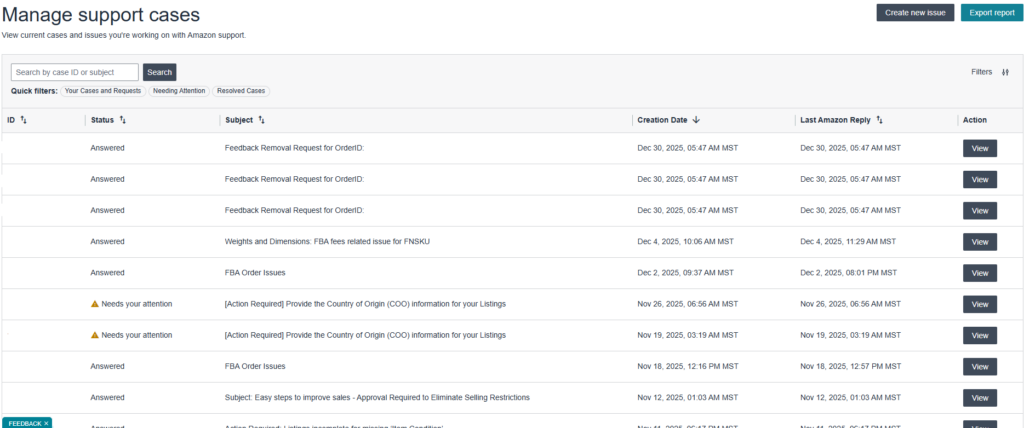
Amazon’s Case Log Interface
Case Log Dashboard Preview
Amazon Seller Central case management interface showing open cases, response times, and case history.
Recommended Monitoring Frequency & Actions
How Often to Check This Report
Daily Monitoring
Check the Case Log Report daily if you have active cases or are dealing with account health issues. Prompt responses to Amazon support requests can significantly impact case resolution times and outcomes.
Minimum Frequency
Review this report at least twice weekly to ensure no cases require your attention and that all communications are being addressed promptly. Set up alerts for new case activity.
Required Actions Based on Report Data
- Respond to Amazon Requests
Provide requested documentation, clarifications, or plan of action within specified timeframes - Follow Up on Stale Cases
Contact support for cases without recent activity or missing expected responses - Document Case Details
Maintain internal records of case communications and resolutions for future reference - Escalate Unresolved Issues
Request case escalation for complex issues not resolved within reasonable timeframes - Update Internal Systems
Sync case resolution information with inventory, listing, or compliance management systems - Review Case Patterns
Identify recurring issues to implement preventive measures and reduce future case volume
Automate Your Amazon Case Log Monitoring with Cajari
Cajari automatically collects this Case Log Report from your Amazon Seller Central account and delivers it to your systems through API endpoints or webhooks. Our platform handles the complex authentication and navigation, then provides structured data that integrates seamlessly with your helpdesk tools, CRM systems, and custom dashboards.
Stop manually checking for case updates and start responding to Amazon support requests 2-4 hours faster with automated monitoring.
Book a personalized demo with our team and discover how we can transform your Amazon data workflow.
Have questions or need support? Our team is here to help with onboarding, technical issues, and any inquiries about Cajari.