
Amazon Seller Central Seller Feedback Report
Comprehensive tracking and monitoring of customer feedback and seller performance ratings
The Seller Feedback Report provides complete visibility into all customer feedback received as a seller within the past 90 days. This automated report captures feedback ratings, customer comments, order details, and response opportunities for every piece of feedback. Understanding and managing seller feedback is crucial for maintaining high customer satisfaction, improving your seller metrics, and protecting your account health.
Each feedback record includes the complete rating details, customer comments, order information, and available actions such as contacting the customer or requesting removal. Monitor feedback patterns to identify service issues and opportunities for improvement in your selling operations.
Key Data Fields
Numeric Rating
Customer’s star rating from 1-5 stars, directly impacting your overall seller feedback score and metrics.
Feedback Text
Customer’s written comments explaining their experience with your service, products, or fulfillment.
Order ID
Associated order number linking the feedback to specific transactions and product purchases.
Feedback Date
When the customer submitted their feedback, important for tracking response times and trends.
spacer
Suppress Reason ID
Amazon’s reason for suppressing feedback (if applicable), such as fulfillment issues for FBA orders.
Response Status
Whether you’ve responded to the feedback publicly and the content of your response.
Answer Map Details
Specific rating components including “Item as Described” boolean ratings and detailed feedback categories.
Suppression Status
Whether the feedback is fully suppressed, partially suppressed, or active and impacting your metrics.
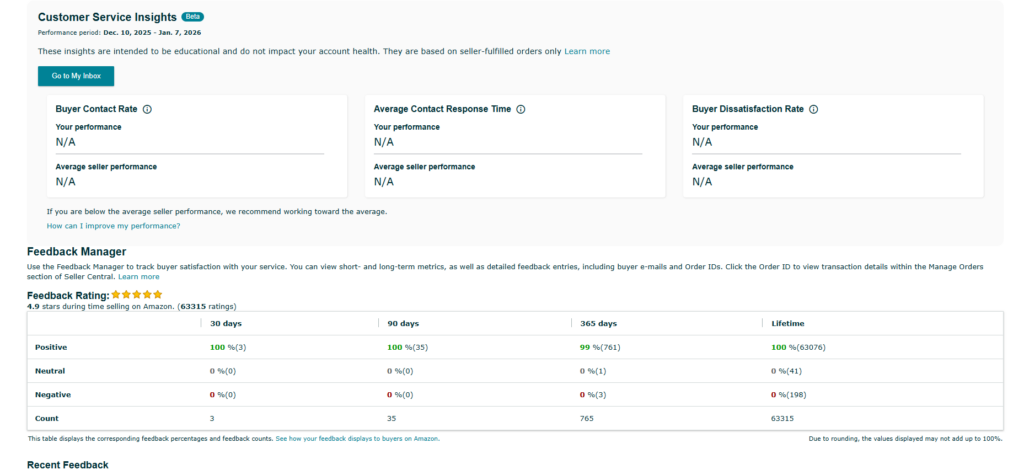
Amazon’s Feedback Manager
Available at:
Seller Central → Performance → Feedback Manager
Recommended Monitoring Frequency & Actions
How Often to Check This Report
Daily Monitoring
Check seller feedback daily to respond quickly to customer concerns and maintain high response rates. Fresh feedback is most likely to receive customer engagement.
Minimum Frequency
At minimum, review feedback 2-3 times per week to ensure you don’t miss opportunities to address customer concerns or request removal of inappropriate feedback.
Required Actions Based on Report Data
- Contact Customers with Low Ratings
Reach out to customers who left 1-3 star feedback to resolve their issues - Post Public Replies
Respond professionally to feedback to show future customers your commitment to service - Request Feedback Removal
Submit removal requests for feedback that violates Amazon’s guidelines - Analyze Feedback Patterns
Identify recurring complaints to improve your products or fulfillment processes - Improve Customer Communication
Update order confirmations, shipping notifications, and follow-up messages - Monitor Suppression Opportunities
Identify feedback that should be suppressed due to FBA fulfillment issues
Automate Your Seller Feedback Monitoring with Cajari
Cajari automatically collects this Seller Feedback Report from your Amazon Seller Central account and delivers structured data to your systems through API endpoints or webhooks. Our platform handles the complex authentication and navigation, then provides detailed feedback information that integrates seamlessly with your customer service tools, CRM systems, and business intelligence dashboards. Stop manually checking for new feedback and start responding to customer concerns faster with automated alerts and sentiment analysis.
Book a personalized demo with our team and discover how we can transform your agency’s workflow.
Have questions or need support? Our team is here to help with onboarding, technical issues, and any inquiries about Cajari.